jueves, septiembre 11, 2014

Defend your Application with Hystrix


In previous post http://www.lordofthejars.com/2014/07/rxjava-java8-java-ee-7-arquillian-bliss.html we talked about microservices and how to orchestrate them using Reactive Extensions using (RxJava). But what's happen when one or many services fail because they have been halted or they throw an exception? In a distributed system like microservices architecture it is normal that a remote service may fail so communication between them should be fault tolerant and manage the latency in network calls properly.

And this is exactly what Hystrix does. Hystrix is a latency and fault tolerance library designed to isolate points of access to remote systems, services and 3rd party libraries, stop cascading failure and enable resilience in complex distributed systems where failure is inevitable.

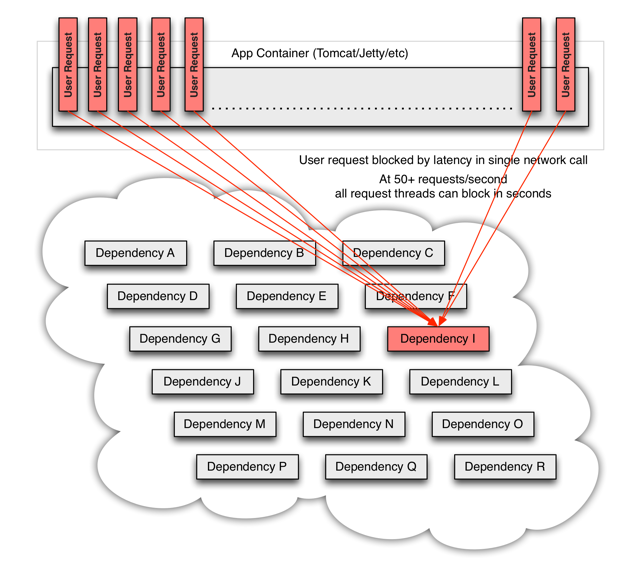
In a distributed architecture like microservices, one service may require to use other services as dependencies to accomplish his work. Every point in an application that reaches out over the network or into a client library that can potentially result in network requests is a source of failure. Worse than failures, these applications can also result in increased latencies between services. And this leaves us to another big problem, suppose you are developing a service on a Tomcat which will open two connections to two services, if one of this service takes more time than expected to send back a response, you will be spending one thread of Tomcat pool (the one of current request) doing nothing rather than waiting an answer. If you don't have a high traffic site this may be acceptable, but if you have a considerable amount of traffic all resources may become saturated and and block the whole server.

An schema from this scenario is provided on Hystrix wiki:


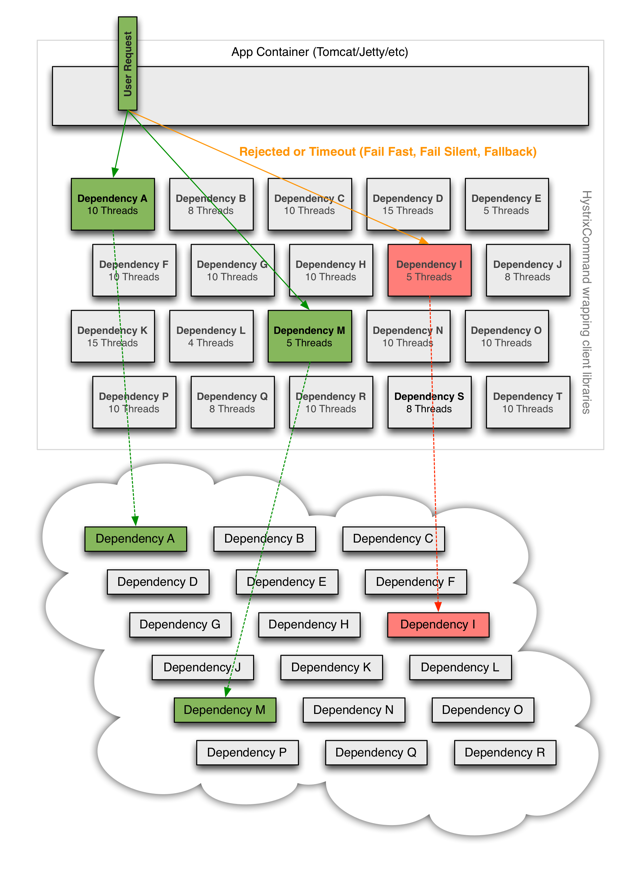
The way to avoid previous problem is to add a thread layer which isolates each dependency from each other. So each dependency (service) may contain a thread pool to execute that service. In Hystrix this layer is implemented by HystricxCommand object, so each call to an external service is wrapped to be executed within a different thread.

An schema of this scenario is provided on Hystrix wiki:


But also Hystrix provides other features:
  • Each thread has a timeout so a call may not be infinity waiting for a response.
  • Perform fallbacks wherever feasible to protect users from failure.
  • Measure success, failures (exceptions thrown by client), timeouts, and thread rejections and allows monitorizations.
  • Implements a circuit-breaker pattern which automatically or manually to stop all requests to an external service for a period of time if error percentage passes a threshold.
So let's start with a very simple example:


And then we can execute that command in a synchronous way by using execute method.

new HelloWorldCommand().execute();

Although this command is synchronous, it is executed in a different thread. By default Hystrix creates a thread pool for each command defined inside the same HystrixCommandGroupKey. In our example Hystrix creates a thread pool linked to all commands grouped to HelloWorld thread pool. Then for every execution, one thread is get from pool for executing the command.

But of course we can execute a command asynchornously (which perfectly fits to asynchronous JAX-RS 2.0 or Servlet 3.0 specifications). To do it simply run:


In fact synchronous calls are implemented internally by Hystrix as return new HelloWorldCommand().queue().get(); internally.

We have seen that we can execute a command synchronously and asynchronously, but there is a third method which is reactive execution using RxJava (you can read more about RxJava in my previous post www.lordofthejars.com/2014/07/rxjava-java8-java-ee-7-arquillian-bliss.html).

To do it you simply need to call observe method:


But sometimes things can go wrong and execution of command may throw an exception. All exceptions thrown from the run() method except for HystrixBadRequestException count as failures and trigger getFallback() and circuit-breaker logic (more to come about circuit-breaker). Any business exception that you don't want to count as service failure (for example illegal arguments) must be wrapped in HystrixBadRequestException.

But what happens with service failures, what Hystrix can do for us? In summary Hystrix can offer two things:
  1. A method to do something in case of a service failure. This method may return an empty, default value or stubbed value, or for example can invoke another service that can accomplish the same logic as the failing one.
  2. Some kind of logic to open and close the circuit automatically.

Fallback:

The method that is called when an exception occurs (except for HystrixBadRequestException) is getFallback(). You can override this method and provide your own implementation.


Circuit breaker:

Circuit breaker is a software pattern to detect failures and avoid receiving the same error constantly.
But also if the service is remote you can throw an error without waiting for TCP connection timeout.

Suppose next typical example: A system need to access database like 100 times per second and it fails. Same error will be thrown 100 times per second and because connection to remote Database implies a TCP connection, each client will wait until TCP timeout expires.

So it would be much useful if system could detect that a service is failing and avoid clients do more requests until some period of time. And this is what circuit breaker does. For each execution check if the circuit is open (tripped) which means that an error has occurred and the request will be not sent to service and fallback logic will be executed. But if the circuit is closed then the request is processed and may work.

Hystrix maintains an statistical database of number of success request vs failed requests. When Hystrix detects that in a defined spare of time, a threshold of failed commands has reached, it will open the circuit so future request will be able to return the error as soon as possible without having to consume resources to a service which probably is offline. But the good news is that Hystrix is also the responsible of closing the circuit. After elapsed time Hystrix will try to run again an incoming request, if this request is successful, then it will close the circuit and if not it will maintain the circuit opened.

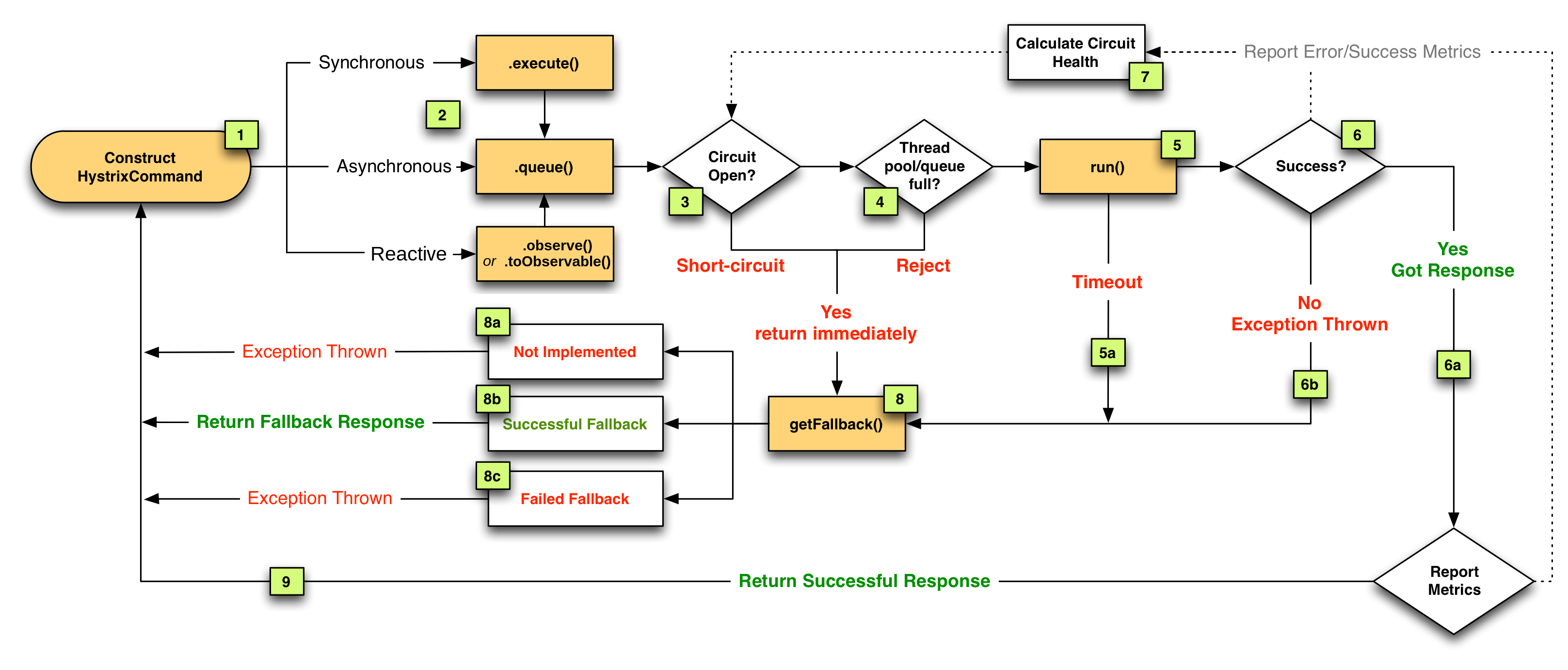
In next diagram from Hystrix website you can see the interaction between Hystrix and circuit.


Now that we have seen the basics of Hystrix, let's see how to write tests to check that Hystrix works as expected.

Last thing before test. In Hystrix there is an special class called HystrixRequestContext. This class contains the state and manages the lifecycle of a request. You need to initialize this class if for example you want to Hystrix manages caching results or for logging purposes. Typically this class is initialized just before starting the business logic (for example in a Servlet Filter), and finished after request is processed. 

Let's use previous HelloWorldComand to validate that fallback method is called when circuit is open.


And the test. Keep in mind that I have added a lot of asserts in the test for academic purpose.


This is a very simple example, because execute method and fallback method are pretty simple, but if you think that execute method may contain complex logic and fallback method can be as complex too (for example retrieving data from another server, generate some kind of stubbed data, ...), then writing integration or functional tests that validates all this flow it starts having sense. Keep in mind that sometimes your fallback logic may depends on previous calls from current user or other users.

Hystrix also offers other features like cashing results so any command already executed within same HystrixRequestContext may return a cache result (https://github.com/Netflix/Hystrix/wiki/How-To-Use#Caching). Another feature it offers is collapsing. It enables automated batching of requests into a single HystrixCommand instance execution. It can use batch size and time as the triggers for executing a batch. 

As you may see Hystrix is a really simple yet powerful library, that you should take under consideration if your applications call external services.

We keep learning,
Alex.
Sing us a song, you're the piano man, Sing us a song tonight , Well, we're all in the mood for a melody , And you've got us feelin' alright (Piano Man - Billy Joel)


martes, julio 08, 2014

RxJava + Java8 + Java EE 7 + Arquillian = Bliss


Microservices are an architectural style where each service is implemented as an independent system. They can use their own persistence system (although it is not mandatory), deployment, language, ...

Because a system is composed by more than one service, each service will communicate with other services, typically using a lightweight protocol like HTTP and following a Restful Web approach. You can read more about microservices here: http://martinfowler.com/articles/microservices.html

Let's see a really simple example. Suppose we have a booking shop where users can navigate through a catalog and when they find a book which they want to see more information, they click on the isbn, and then a new screen is opened with detailed information of the book and comments about it written by readers.

This system may be composed by two services:
  • One service to get book details. They could be retrieved from any legacy system like a RDBMS.
  • One service to get all comments written in a book and in this case that information could be stored in a document base database.
The problem here is that for each request that a user does we need to open two connections, one for each service. Of course we need a way do that jobs in parallel to improve the performance. And here lies one problem, how we can deal with this asynchronous requests? The first idea is to use Future class. For two services may be good but if you require four or five services the code will become more and more complex, or for example you may need to get data from one service and using it in another services or adapt the result of one service to be the input of another one. So there is a cost of management of threads and synchronization.

It will be awesome to have some way to deal with this problem in a clean and easy way. And this is exactly what RxJava does. RxJava is a Java VM implementation of Reactive Extensions: a library for composing asynchronous and event-based programs by using observable sequences.

With RxJava instead of pulling data from an structure, data is pushed to it which reacts with an event that are listened by a subscriber and acts accordantly. You can find more information in https://github.com/Netflix/RxJava.


So in this case what we are going to implement is the example described here using RxJava, Java EE 7, Java 8 and Arquillian for testing.

This post assumes you know how to write Rest services using Java EE specification.

So let's start with two services:


And finally it is time to create a third facade service which receives communication from the client, sends to both services in parallel a request and finally zip both responses. zip is the process of combining sets of items emitted together via a specified function and sent it back to client (not to be confused with compression :)).


Basically we create a new service. In this case URLs of both services we are going to connect are hardcoded. This is done for academic purpose but in production-like code you will inject it from a producer class or from properties file or any system you will use for this purpose. Then we create javax.ws.rs.client.WebTarget for consuming Restful Web Service.

After that we need to implement the bookAndComment method using RxJava API.

The main class used in RxJava is rx.Observable. This class is an observable as his name suggest and it is the responsible of firing events for pushing objects. By default events are synchronous and it is responsible of developer to make them asynchronous.

So we need one asynchronous observable instance for each service:

Basically we create an Observable that will execute the specified function when a Subscriber subscribes to it. The function is created using a lambda expression to avoid creating nested inner classes. In this case we are returning a JsonObject as a result of calling the bookinfo service. The result is passed to onNext method so subscribers can receive the result. Because we want to execute this logic asynchronously, the code is wrapped inside a Runnable block.

Also it is required to call the onCompleted method when all logic is done.

Notice that because we want to make observable asynchronous apart of creating a Runnable, we are using an Executor to run the logic in separate thread. One of the great additions in Java EE 7 is a managed way to create threads inside a container. In this case we are using ManagedExecutorService provided by container to span a task asynchronously in a different thread of the current one.

Similar to previous but instead of getting book info we are getting an array of comments.

Then we need to create an observable in charge of zipping both responses when both of them are available. And this is done by using zip method on Observable class which receives two Observables and applies a function to combine the result of both of them. In this case a lambda expression that creates a new json object appending both responses.

Let's take a look of previous service. We are using one of the new additions in Java EE which is Jax-Rs 2.0 asynchronous REST endpoints by using @Suspended annotation. Basically what we are doing is freeing server resources and generating the response when it is available using the resume method.

And finally a test. We are using Wildfly 8.1 as Java EE 7 server and Arquillian. Because each service may be deployed in different server, we are going to deploy each service in different war but inside same server.

So in this case we are going to deploy three war files which is totally easy to do it in Arquillian.

In this case client will request all information from a book. In server part zip  method will wait until book and comments are retrieved in parallel and then will combine both responses to a single object and sent back to client.

This is a very simple example of RxJava. In fact in this case we have only seen how to use zip method, but there are many more methods provided by RxJava that are so useful as well like take(), map(), merge(), ... (https://github.com/Netflix/RxJava/wiki/Alphabetical-List-of-Observable-Operators)

Moreover in this example we have seen only an example of connecting to two services and retrieving information in parallel, and you may wonder why not to use Future class. It is totally fine to use Future and Callbacks in this example but probably in your real life your logic won't be as easy as zipping two services. Maybe you will have more services, maybe you will need to get information from one service and then for each result open a new connection. As you can see you may start with two Future instances but finishing with a bunch of Future.get() methods, timeouts, ... So it is in these situations where RxJava really simplify the development of the application.

Furthermore we have seen how to use some of the new additions of Java EE 7 like how to develop an asynchronous Restful service with Jax-Rs.

In this post we have learnt how to deal with the interconnection between services andhow to make them scalable and less resource consume. But we have not talked about what's happening when one of these services fails. What's happening with the callers? Do we have a way to manage it? Is there a way to not spent resources when one of the service is not available? We will touch this in next post talking about fault tolerance.

We keep learning,
Alex.
Bon dia, bon dia! Bon dia al dematí! Fem fora la mandra I saltem corrents del llit. (Bon Dia! - Dàmaris Gelabert)
Music: https://www.youtube.com/watch?v=BF7w-xJUlwM

lunes, junio 09, 2014

Injecting properties file values in CDI using DeltaSpike and Apache TomEE


One of the great improvement in Java EE 5 and beyond it is the introduction of CDI (Context and Dependency Injection). CDI is used for injecting dependencies among a lot of other things like events, interceptors, … and can be used in POJOs.

In some cases instead of injecting other objects (as a dependency injection), you want to inject a value from a properties file into a class that needs to be configured externally.

I have written an example in Tomitribe community zone: https://github.com/tomitribe/community/tree/master/injecting-properties 

We keep learning,
Alex.


Sora ni akogarete  sora wo kakete yuku, Ano ko no inochi wa hikoukigumo (The Wind Rises - Joe Hisaishi, Yumi Arai)

lunes, mayo 19, 2014

Java Cookbook Review


This new edition of Java cookbook is an amazing update of the book which covers a lot of the new features implemented in Java 8. 

The author writes in a clear and concise way how to solve some of the most of basic problems you will encounter in your day to day work in Java.

The book shows you from how to concatenate two strings to use functional interfaces.

Definitely if you have already had some experience (1-2 years) in Java and wants to improve your skills inside Java world, this book is for you. 

But it is even more, if you are a Java6 developer and want to update to Java7 or 8 this book is also for you. The author has taken the time to explain not only how to solve a problem using previous concepts of Java but also using the new ones.
In my opinion the book has only one contra, and it is that although new chapters about new Java API like javax.time has been added, the book spends so much pages on explaining some "outdated" technology like Swing or AWT.

Really pleasant book to read, very concise about what is the problem to be resolved, and although you consider yourself as a Java "expert", you will learn something for sure.

Testing Polyglot Persistence Done Right [slides]


This week I was at Krakow in the amazing conference called GeeCon. My talk was "Testing Polyglot Persistence Done Right" and it was cospoken with my friend Bartosz Majsak.

The abstract was:

"Data storage is one of the most crucial parts of any applications, and we use many different tools and tricks to keep it in a good shape. We frequently use both old school relational systems with new approaches commonly known as NoSQL. We write sophisticated queries and use optimization techniques to give our end users the greatest possible experience.
So why is persistence very often skipped in the testing efforts? Is it really that complex and painful to setup? During this talk we will have a closer look at Arquillian Persistence Extension together with NoSQLUnit. These tools remove that burden and boilerplate to make you a happy and productive programmer again! Join this session and see for yourself that writing tests for your data storage logic is as easy as writing normal unit tests!"

And here you can see the slides (http://www.slideshare.net/asotobu/testing-polyglot-persistence-done-right). If you have any question don't hesitate to approach us.


We keep learning,
Alex.
En los mapas me pierdo. Por sus hojas navego. Ahora sopla el viento, cuando el mar quedó lejos hace tiempo. (Pájaros de Barro - Manolo García)

Music: https://www.youtube.com/watch?v=9zdEXRKJSNY


lunes, abril 21, 2014

JPA Tip: Inject EntityManager instead of using PersistenceContext


Almost all projects you develop with Java EE will contain a persistence layer and probably you will use JPA for dealing with SQL systems. One way to get an EntityManager is using @PersistenceContext. In this post we are going to explore the advantages of injecting EntityManager instead of using PersistenceContext annotation.

I have written the example and the explanation on github using Docstract.  You can read on https://github.com/tomitribe/community/tree/master/injecting-entitymanager.

We keep reading,
Alex
Pistol shots ring out in the bar-room night, Enter Patty Valentine from the upper hall, She sees a bartender in a pool of blood, Cries out, "My God, they killed them all" (Hurricane - Bob Dylan)

Music: https://www.youtube.com/watch?v=hr8Wn1Mwwwk

lunes, abril 14, 2014

Docstract-0.2.0 Released.


Docstract is an small java project which reads a java source file, extracts the comments between /** and */ sequentially from all over the file and stores them inside an output AsciiDoc file. The idea is not new in fact it is from https://github.com/javaee-samples/javaee7-samples/ developed by Aslak Knutsen but instead of using Ruby and inside Awestruct, this project is written in java and it is run from CLI.

Let me show you an example to understand what this application does:

This is a class which contains some comments to be processed.

And the output document looks like:

Note that in comments we are also using include macro for inserting files inside. The rules for inclusion are the next ones:

  • if include contains a java file, like first example, the whole class is read and inserted within AsciiDoc source code blocks.
  • if include contains a java file but with # symbol, like second one, the right part of # will be used as method name of given class. So for example Project#setId(String, String) will include a method of Project's class called setId and receiving two string parameters.
  • if include contains an xml file, the file is inserted "as is" within AsciiDoc source code block.
  • if include contains an xml file and between brackets there is an xpath expression, the result of that expression will be inserted.
  • any other include is left "as is", so it will be processed by AsciiDoc(tor) processor.

Also note that the include files will be resolved relative from place where the CLI is being run, typically from the root of the project.

You can use callouts inside java and xml code and the processor will render it in the proper way.

In java you can write a callout as a single line comment with callout number between <, > at start.

In xml you can write callouts between +xml+ comments and the callout number being the first word.

You can grab a runnable jar from https://bintray.com/lordofthejars/generic/Docstract/0.2.0/view/files

To render previous class we can call as:

java -jar docstract-<version>.jar --input=src/test/java/com/lordofthejars/asciidoctorfy/MM.java --output=README.adoc


And an AsciiDoc file will be generated from comments blocks.

There is one optional parameter called --baseDir. This parameter is used to set the baseDir in include macros. So for example if you set baseDir to /home/lotj/project, the include macro will be resolved to include::/home/lotj/project/src/test/java/....


New features will be added when they are required but of course feel free to clone and improve it.


We Keep Learning,
Alex.
Weiß mit dem Locken umzugehn, Und mich auf's Pfeifen zu verstehn. Drum kann ich froh und lustig sein, Denn alle Vögel sind ja mein. (Die Zauberflöte - Wolfgang Amadeus Mozart)
Music: https://www.youtube.com/watch?v=PRtvVQ1fq8s

miércoles, marzo 26, 2014

Apache TomEE + NoSQL (writing your own resources)


@Resource annotation appeared for the first time in Java EE 5 specification.  When you annotate an attribute with @Resource, it will be the container responsible of injecting the requested resource. The typical example is used with DataSource class.

That's great and you can use it with JMS as well, but what's happening to NoSQL databases, would not it be perfect to do something similar for them?

With Apache TomEE you can do it by providing your own @Resource provider class. In this post we are going to see how you write your own provider for MongoDB so you can use @Resource for MongoDB too.

The first thing to do is create the provider class, which is a simple POJO:

It is a simple POJO with a method which returns a MongoClient class (the base class for Java MongoDB driver), and setters with required parameters.

Next step is creating a file called resources.xml in WEB-INF directory. In this file we configure TomEE so he knows about the provider/class.

Notice that in this file you set the provider class and how the attributes are set. In fact you set them more or less like a properties file. So when you are are writing address 127.0.0.1, TomEE under the cover will call provider.setAddress("127.0.0.1"). 

The last thing to do is start using @Resource annotation with MongoDB.

So in this case we are creating a MongoClient provider because TomEE requires a no parameters constructor, but MongoClient has parameters so we need to create a provider class with a method which returns the MongoClient instance to be used.

And what really is awesome about TomEE is that you can even override your @Resource definitions from system properties, so you can do something like:

-Dmongo.address=localhost

where mongo is the id of the resources file and address the name of the field.

So you can change each of the value in an easy way depending on the environment you are pushing. And that's an awesome thing.

So now there is no excuses to not start treating NoSQL databases like SQL databases from the point of view of Java EE.

[Update] Romain notice me that with latest version of Apache TomEE you don't need a default constructor, parameters are bound directly properties as constructor params

We keep learning,

Alex.

Et j’ai sa main!, Jour prospère!, Me voici, Militaire et mari! (Ah mes amis - Gaetano Donizetti)

Music: https://www.youtube.com/watch?v=3aS6M8j3pvQ

martes, febrero 18, 2014

Learn CDI with Apache TomEE [Video tutorials]


In this post I have grouped a collection of videos I recorded some time ago to learn the basic concepts of CDI (Context and Dependency Injection) using Apache TomEE. I suggest clicking the YouTube icon to watch them directly from YouTube site and configure them in HD.

Servlets


CDI (Inject)


CDI (Scopes)


CDI (Name Qualifiers)


CDI (Qualifiers)


CDI (Alternatives)


CDI (Postconstruct)


CDI (Producer)


CDI (Events)


CDI (Interceptors)


CDI (Decorators)


We Keep Learning,
Alex.

Que vas a hacer sin mí, Cuando tú te enteres que you estoy pegao, Con el que sabe no se juega, Y si se juega con cuidado (El Cuchi Cuchi - Mayimbe)

lunes, febrero 17, 2014

Aliens have invaded Undertow

What is Undertow?

Undertow is a flexible performant web server written in java, providing both blocking and non-blocking API’s based on NIO.

Undertow has a composition based architecture that allows you to build a web server by combining small single purpose handlers. The gives you the flexibility to choose between a full Java EE servlet 3.1 container, or a low level non-blocking handler, to anything in between.

Undertow is sponsored by JBoss and is the default web server in the Wildfly Application Server.

Writing tests for Undertow

Arquillian-Container-Undertow as every Arquillian Container Extension  it take cares of you of starting, stopping and deploying the application. Also provides an Shrinkwrap resolver for creating the Undertow deployment file.

To simplify the development of tests on Undertow we have created two Shrinkwrap resolvers:
  • Embedded Servlet Deployment
  • Non-blocking handler

Maven Artifacts


Embedded Servlet Deployment


When you want to deploy a servlet/s inside Undertow, you must create a DeploymentInfo class and provide all the required information. 

For this reason Arquillian-Container-Undertow provides a Shrinkwrap resolver named UndertowWebArchive.


And then we can write our test:

Non-blocking handler


But with Undertow you can also write non-blocking handlers. For creating a non-blocking handler in Undertow you simply must create a class that implements HttpHandler interface and register it. For this reason Arquillian-Container-Undertow provides a Shrinkwrap resolver named UndertowHttpHandlerArchive.


And then we can write our test:

Configuration


You can configure the bind address and port of Undertow. By default Undertow is opened at localhost:8080.

But you can also set the bind address and the listening port.

<1> If port is set to -1, a random port between 1024 and 49151 is used.

So now you can write tests for Undertow container within the context of Arquillian.

We keep learning,
Alex.

Oh django! After the showers is the sun. Will be shining... (Django - Luis Bacalov & Rocky Roberts)

Music: https://www.youtube.com/watch?v=UX3h22aABIc

lunes, enero 27, 2014

DRY with examples on documentation. Include Java Extension for Asciidoctor.


One of the great features that Asciidoctor offers us as a writers of manuals, tutorials and documentation in general is that allows us to follow the DRY pattern. If for example you are writing a tutorial, probably you will have one part of the tutorial which will be the documentation, and another part which will be source code with examples. Asciidoctor allows us to write the documentation and include the examples directly from source code project to document.

For example:


As you can see you can include directly from source code the example and Asciidoctor will render it inside the document. Moreover if you set the language, Asciidoctor will highlight the code too.

But as you can see there is one problem with this approach, you are including the whole file, with imports, javadoc, comments, ... and maybe you only want to show a method of that class. Now with Asciidoctor you have two options:

Using lines attribute:

Which have the problem that modifying original source code also modifies the code embedded inside tutorial.

Using tags:

Which is an invasive method that requires you modify the original source code:


But now we have got another option in case your language is Java. And it is using java-semantic-asciidoctorj extension. This extension allows us to embed parts of the code by its components. That is you can set which method to add, which class, if you want to add imports or not, ... The extension only works with asciidoctorj-1.5.0.preview1 and beyond, and uses the new SPI for extensions, so you only have to add the jar extension on classpath, and the extension is automatically registered.

An example of usage of this extension could be the next one. Let's imagine that we have a class with 5 methods and we want to include only a method called mymethod which receives an String as parameter and it has no return value. Also we want to add the imports, but nothing else.

We could do something like:

Note that now we are not invading our code with comment-tags, nor fixing the position with lines of the method inside our document.

The attributes you can set in include are:
  • imports: adds the imports.
  • fields: adds the fields of the main class.
  • class: adds all the content of the main class.
  • enum=<classname>: adds the enum with the given name. The enum should be defined inside the class we are adding.
  • annotation=<classname>: same as enum but for annotations.
  • class=<classname>: same as enum but for inner classes.
  • contructor=<constructorName>(<parameterType1>,<parameterType2>, ....): adds the defined constructor. In this case we must set the constructor name and the type of each parameter. For example: MyClass(String).
  • method=<returnType> <methodName>(<parameterType1>, <parameterType2>, ...): same as constructor but for methods, which implies adding the return type. Note that it is not required to add any modifier nor throws classes.

Now we can use our classes within our documentation and by adding the required block.

This version of plugin works with Java 1.7 and before, not with Java 1.8 but it could work in some cases.

The extension is published on bintray, so to install you simply have to add bintray repository and the required dependency:

The project is hosted at: https://github.com/lordofthejars/asciidoctorj-extensions

We keep learning,
Alex.
I feel shouting ya-hoo, And me still feeling hungry, Cowabunga!!, Cookie monster went and ate the new red two. Monster Went and Ate My Red 2 - Elvis Costello & Elmo
Music: https://www.youtube.com/watch?v=KxardpBReQc

viernes, enero 24, 2014

Reporting JBehave results in AsciiDoc format.


JBehave is a framework for Behaviour-Driven Development (BDD). BDD is an evolution of test-driven development (TDD) and acceptance-test driven design, and is intended to make these practices more accessible and intuitive to newcomers and experts alike. The core of JBehave from the point of view of end users are user story files, where we define stories that our product should meet to validate that we are aligned with what our client wants. These stories are run every time a change has done in the project, so we can still ensure that nothing has been broken and we are still delivering the right thing. To validate this, a report is generated by JBehave so we can inspect the result of all stories and be sure that all is ok and if there is something wrong, which stories and why they have failed. By default the formats supported by JBehave are TXT, HTML or XML. 

With the advent of markup languages for writing documentation, it has sense to be able to embed this reports inside our documentation system, because the result of a build should be considered as documentation too so everyone involved directly or indirectly on the project can review the real state of the project. One of the trending markup language nowadays is AsciiDoc (and Asciidoctor). It is for this reason that I have developed a JBehave report extension so reports are written in AsciiDoc format and consequently be embedded inside another AsciiDoc document.

Let's see an example of a report generated using AsciiDoc reporter, then the report of story is included inside a master AsciiDoc document and finally rendered using Asciidoctor to HTML.


The first part of the document we can see the story that is being executed (calculator_mult_stories.story). Just below we can see the result of the story in one sentence and with an icon. In this case there is one failure in one step (see below) so an ambulance icon is used. If there would be no errors then a green rocket is used, and if any pending or ignored steps then a yellow lorry is used. After that, description, meta-information and narrative data about story is printed. Then given stories of this story is printed with the result of all of them. In this case one given story has been executed and his scenario has just passed correctly.

Note that you can navigate to the result of a given story by simply clicking on the link provided in Given Stories information section.

And the document continues with:

After user stories the scenarios of current story are printed with their results. In this example as in previous one note that examples are used and are shown as a table. Finally all steps executed with its result are printed. Note that the final step have just failed and the cause of the error is shown.

So as you can see you can embed test result inside another AsciiDoc document and make them look clear for anyone who wants to review the state of the project.

But now let's see how to use AsciiDoc reporter inside JBehave.

Reporter is released on bintray, so the first thing is to add as repository maven bintray.

Then we can add the dependency on our project:

And now we can configure StoryReporterBuilder with adoc format.

And that's all, now when you run JBehave your reports will appear on output directory as HTML or TXT but also  as AsciiDoc.

We keep learning,
Alex.
He's the guy who's the talk of the town, with the restless gun, don't shoot broad out to fool him around (Lo chiamavano Trinità - Annibale E I Cantori Moderni)
Music: https://www.youtube.com/watch?v=w5HkxTLp5jA 


jueves, diciembre 19, 2013

Documentation is a Living System with Asciidoctor


In Agile methodology is very important to iterate over and over again walking small steps so all team (which I also include the customers), can receive quick feedback of how the project is going on. 

Aligned with this requirement, is where Continuous Integration/Continuous Delivery has sense. Every new commit, implies among a lot of other stages compile, execute unit/integration tests, execute code quality or execute acceptance tests. All these kind of tests generate some kind of documentation (usually an HTML file) as a report. To improve the visibility of the project to all team members, it is a good practice to publish these reports to a webserver so all members can access to it and inspect the result of that compilation and the progress of the project.

But with the advent of lightweight markup languages like Markdown or AsciiDoc, the documentation of the projects is (or should be) treated as source code too, so it should be delivered as any other part of the system like for example test reports, so that every member of the team should see exactly the progress of the documentation at the time of packaging. 

In this post we are going to see how to acquire this we are going to use Asciidoctor-Maven-Plugin and Maven-Assembly-Plugin, to create a war file containing your documentation which at the end could be uploaded to a server using for example Cargo-Maven-Plugin or in your Jenkins pipeline.

The first thing to do is create a project with source code, test code and of course documentation. 

Because it is a good idea to treat documentation as code (it would require another post to talk about it), we can put documentation inside src/main/resources, and create a document for each module inside the package of the module. So for example if in src/main/java/com/mycompany/users we have all code developed about user management, you will put documentation about user management in src/main/resources/com/mycompany/users, or if you prefer src/main/docs/com/mycompany/users, but as you can see the documentation should be very close to developer, in fact in same project workspace. 

You can see a full example in https://github.com/lordofthejars/foobank.

And now it is time to render documentation each time the build is done and package it into a war file.

To render the documentation we are going to use Asciidoctor-Maven-Plugin and Assembly-Maven-Plugin.

Let's see how to configure Asciidoctor-Maven-Plugin:


The plugin renders all AsciiDoc files that are at src/main/resources folder and its subfolders. They are rendered in HMTL format, and by default are rendered at target/generated-docs.

Now the we have all our documentation files rendered as HTML, it is time to package them inside a WAR file so we can deploy them into a web server using Assembly-Maven-Plugin.


The name of the output file is foobank because we are using finalBuild tag, and finally Assembly plugin requires a file called assembly.xml to configure which files are included in package and the output directory.

Note that we are adding a suffix to the output file by using id tag, so the final name will be foobank-doc.war. And finally we setup that all files inside target/generated-docs will be packaged.

And now you can deploy this WAR file in your documentation server, so every team on your project will be able to read the latest content generated at the same time of compiling, packaging or deploying your application. Your documentation is treated as code.

You can see a full example in https://github.com/lordofthejars/foobank.

We keep learning,
Alex.

Desolation comes upon the sky, Now I see fire, Inside the mountain, I see fire (I See Fire - Ed Sheeran)
Music: http://www.youtube.com/watch?v=DzD12qo1knM

sábado, diciembre 14, 2013

Asciidoctor Meets JBehave.


User story is one or more sentences in natural language or business language which captures the requirements of what end user wants to be implemented in the product we are developing.

User Stories typically have the form:

"In order to <receive benefit> as a <role>, I want <goal/desire>"

User stories are also documentation for our project, first of all because they express what the product should do, and second one because they will be used by our clients/stakeholders, to validate that we are building the right thing.

JBehave is a framework for Behaviour-Driven Development (BDD). BDD is an evolution of test-driven development (TDD) and acceptance-test driven design, and is intended to make these practices more accessible and intuitive to newcomers and experts alike. The core of JBehave from the point of view of end users are user story files, where we define stories that our product should meet to validate that we are aligned with what our client wants. A user story example in JBehave is:


Note that first sentence is a description, then a narrative section which contains sentences of the form in order to, as a, I want. And finally the definition of scenarios that must meet this story to be considered completed.

So as you can see, story files are project documentation, and as project documentation would be awesome if we could add them inside our documents as documentation and not as simple plain text. And here is where Asciidoctor comes to action. Asciidoctor is a Ruby, Java and Javascript processor for converting AsciiDoc source files and strings into HTML 5, DocBook 4.5 and other formats. Your project may contain different kind of documents written in AsciiDoc like Software Design Specifications (SDS), manuals, or for example a test plan. And it is in test plan where including user stories, could be a really good improvement. And for this reason jbehave-asciidoctorj-extension has been developed.

Let's see an example. Suppose that we are writing a document where we want to test some user stories manually (apart of automatically of course) due to the criticality of the process:


As you can see we have created a simple AsciiDoc document with some information. But the interesting part is include::jbehave::userStories:src/**/*.story[initialLevel=1, manual=true]. Note that we are including all jbehave userstories that are placed on src folder. This extension supports any valid glob expression. And at the end we can set two attributes, the first one is the initial level of the section where user stories will be rendered (remember that the first one is 0), and finally if the steps will be executed manually or not, which has a deep impact on final rendered document as we will see soon.

Our project has two story files:


As you can see the second story has a dependency to the first story, which means that this second story is only valid if first story has passed successfully. Apart from this fact, we can set examples as tables as well.

So let's see an screenshot of previous document rendered:


I think it is important to note two blocks. The first one is the NOTE block. See that GivenStories are rendered as Admonition, and with a link pointing to another story; this is pretty important because clicking there it will move the page where that (precondition) story was defined, so you can also inspect what was that story about. The other interesting part is the Result part. Because we have set user stories as manual, the extension will render three checkboxes so tester can mark if the scenario passes, fails or also if he wants to add some comment.

So now there is no excuse to not adding user stories in your documents in a really fashion way.


We keep learning,
Alex.
Maman dit Annotate"travailler c'est bien", Bien mieux qu'être mal accompagné, Pas vrai ? (Papaoutai - Stromae)


martes, diciembre 03, 2013

Are Configuration Files Documentation? ... Yes!!! TomEE + Asciidoctor Example


Normally in our projects we generate a considerable amount of documentation. Some documentation is directly a document written as is, for example Software Requirements Specifications (SRS) or Software Design Specifications (SDS), but there are other pieces of our projects that although they are not a document directly, they are consulted by developers/testers/managers, customers ... and treat it as is, for example user stories written by developers and/or QA in Cucumber or JBehave format or  javadoc. And now I ask to myself, are configuration files documentation too? Are people interested in having them in a document and treat them as documentation? And the answer is YES!!!. In this post we are going to see how to transform TomEE's configuration file into a document using an Asciidoctor extension I have developed specially for this occasion.

In TomEE, resources and containers can be configured inside a file called tomee.xml among other places. But what really makes interesting is that a subset of this file can be put inside the project, so each web application is responsible of configuring their own resources, for example DataSources, JMS Queues, ....  And having the ability of putting specific configuration of the server inside the application also opens the doors of creating more than one configuration file per application, and load one or another depending on the environment we are going to deploy the application. For example:
  • In developer environment the DataSource could point to an embedded database.
  • In QA environment the DataSource could point to a database installed on localhost.
  • In Stage environment the same DataSource points to an external IP1.
  • In Production environment the same DataSource points to an external IP2.
So as you can see, it would be interesting to have all these information as readable documentation, so everyone involved in the project could review it and for example know exactly which servers are being used in each environment as datasources, or configuration parameters like pool size of stateless manager.

And this is exactly what tomee-asciidoctor-extension does. It allows us to embed Apache TomEE configuration files into an AsciiDoc documentation.

Let's see an example of Apache TomEE configuration file:


This is a typical configuration file where for example you can see some DataSources defined, custom resource or definition of TransactionManager.

Probably your projects will have a document called for example infrastructure (or something similar) where all information related with the software that is being used in the project and  environments used will be described.

A simple example of these kind of documents can be:

Note that besides describing the software that is going to be used for solving our problem, in this case an Apache TomEE, we are using the tomee-asciidoctor-extension to add the Apache TomEE's container and resources configuration file, so when someone wants to inspect the documentation will also see exactly the configuration values that had Apache TomEE at time of generating the document. If you look carefully you only need to add next line to transform a Apache TomEE configuration file into documentation:

include::tomee:/home/alex/git/asciidoctorj-extensions/tomee-asciidoctorj-extensions/src/test/resources/resources.xml[initialLevel=2]

In this case we are including a file called resources.xml. Note that in order to extension detects an Apache TomEE configuration file, we need to use the special keyword tomee: followed by the location of the file. Also note that we are using an attribute called initialLevel. Because we are embedding one document into another one, we need a way to set at which level the document will be rendered, and this is what this attribute is designed for.

Previous document rendered with default style sheet looks like:


See that thanks of Asciidoctor and its extension system, we are able to convert configuration files to documentation.

You can see the code of this extension at: https://github.com/lordofthejars/asciidoctorj-extensions/tree/master/tomee-asciidoctorj-extensions

We keep learning,
Alex.
Siente y baila y goza, Que la vida es una sola, Voy a reír, voy a bailar, Vive, sigue, Siempre pa'lante (Vivir Mi Mida - Marc Anthony)

Music: http://www.youtube.com/watch?v=YXnjy5YlDwk

sábado, noviembre 16, 2013

Is there an Asciidoctor on board ?


On October 21, 2013 Dan Allen and I were interviewed in JBoss Asylum by Emmanuel Bernard and Max Rydahl Andersen about Asciidoctor.

It was an honor to share this talk with all of them, and you can listen the whole podcast at http://jbosscommunityasylum.libsyn.com/podcast-32-is-there-an-asciidoctor-on-board and listen why AsciiDoc and Asciidoctor rocks.


Tomcat y Java EE con TomEE {y mucho más}


Aquí podéis ver la presentación que hice sobre Apache TomEE en los JavaDays 2013 en la GuateJug (La comunidad Java en Guatemala).


También podéis visualizar el video en el canal de YouTube de la comunidad GuateJug.


Dar las gracias a David por pensar en mi como su sustituto, y ofrecerme la oportunidad de presentar Apache TomEE a la comunidad Java de Guatemala. Un placer, y un abrazo muy fuerte a la comunidad GuateJug, por tratarme tan bién.

lunes, octubre 21, 2013

Resistance is futile mocks will be assimilated


My slides of my recently talk about testing at Codemotion Madrid. The summary of the talk was:

Everybody is unit testing, everybody is mocking. Everybody mocks database access, software dependencies, external systems, container services, ... to test what? You end up testing a bit of business logic and writing a lot of test code, when in production this code will run within a container under different circumstances. In this talk we are going to see how some tools like Arquillian, Byteman, NoSQLUnit and other programs, may help us writing real tests in a Java EE environment.


I would like to say thank you very much to Laura and all the team to arrange such a great conferences. Hope to see you in next Codemotion.

miércoles, septiembre 04, 2013

NoSQLUnit 0.7.7 Released


NoSQLUnit is a JUnit extension to make writing unit and integration tests of systems that use NoSQL backend easier. Visit official page for more information.

In 0.7.7 release, next changes has been added:
I would like to say thank you to javahelp, ochrons, Jdourd, JordiAranda and anton-kostyliev for their help.

We keep learning,
Alex.
I belong with you, You belong with me, You're my sweetheart (Ho Hey - The Lumineers)

Music: http://www.youtube.com/watch?v=zvCBSSwgtg4

lunes, julio 22, 2013

AsciiDoc Editor with MarkItUp


In this post I am going to show you how to use MarkItUp jquery library to create a markup editor, concretely an editor for AsciiDoc format.  Apart from MarkItUp library we are going to use asciidoctor.js library for rendering purposes.

MarkItUp! is a JavaScript plugin built on the jQuery library. It allows you to turn any textarea into a markup editor. And in next screencast I am going to show you how to use it.


We keep learning,
Alex.

Your love is blind, blind as a bat, The way that you're leading me home like that, Your love is blind, blind as bat (Blind as a Bat - Meatloaf)

Code: https://github.com/lordofthejars/asciidoctor-markitup
Music: http://www.youtube.com/watch?v=EpzeSSeOvw0